1. set up a new printer :- Trying to get your new printer up and running? Here are the basic steps you'll follow to set up almost any printer.
 |
| Dig. 1 |
B.Connect the included cable (usually a USB cable) from the printer to the computer. Note: The process will be different if you're using a wireless printer; we'll talk more about that later on.

Dig 1.1
C. On your computer, locate the Printer settings. If you're using a Windows computer, you'll find these in the Control Panel. If you're using a Mac, you'll find them in System Preferences.

D.Look for the option to Add a printer, then follow the instructions that appear.

E. Now it's time to try printing something! For example, you could try printing this test page. After you click the link, select File > Print from your web browser's menu, or simply press Ctrl+P on your keyboard (or Command+P if you're on a Mac).
F. A dialog box will appear. Locate and select the new printer from the list, then click Print.
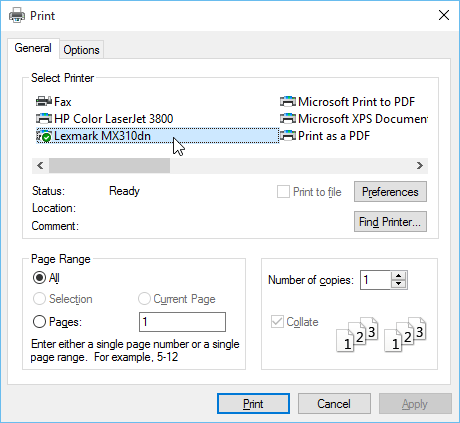
G.The item will then be printed. But if it doesn't work, don't panic! You can try using some of the solutions to common problems below.
PLEASE FOLLOW ME ON SOCIAL NETWORK
Note :- 1.Find the below link for short video clip.
Credit :- Video link is taken by Telstra Channel. Only for educatinal purpose.
https://www.youtube.com/watch?v=DRjeTDUhjaM&feature=youtu.be
--------------------------Thank You For Watching ---------------------
Useful Links
PLEASE FOLLOW ME ON SOCIAL NETWORK


Nice
ReplyDelete